Why Is My Crypto Transaction Pending?
What Does a Pending Transaction Mean?
A pending transaction has been created or submitted but has not yet received enough confirmation from the blockchain network. The recipient should not treat the payment as final while it is pending.
Gem Wallet submits transactions to blockchain networks, but it does not control when miners or validators confirm them. Confirmation time depends on the selected network, its current activity, and the transaction fee.
Reproduce and Check the Pending Status
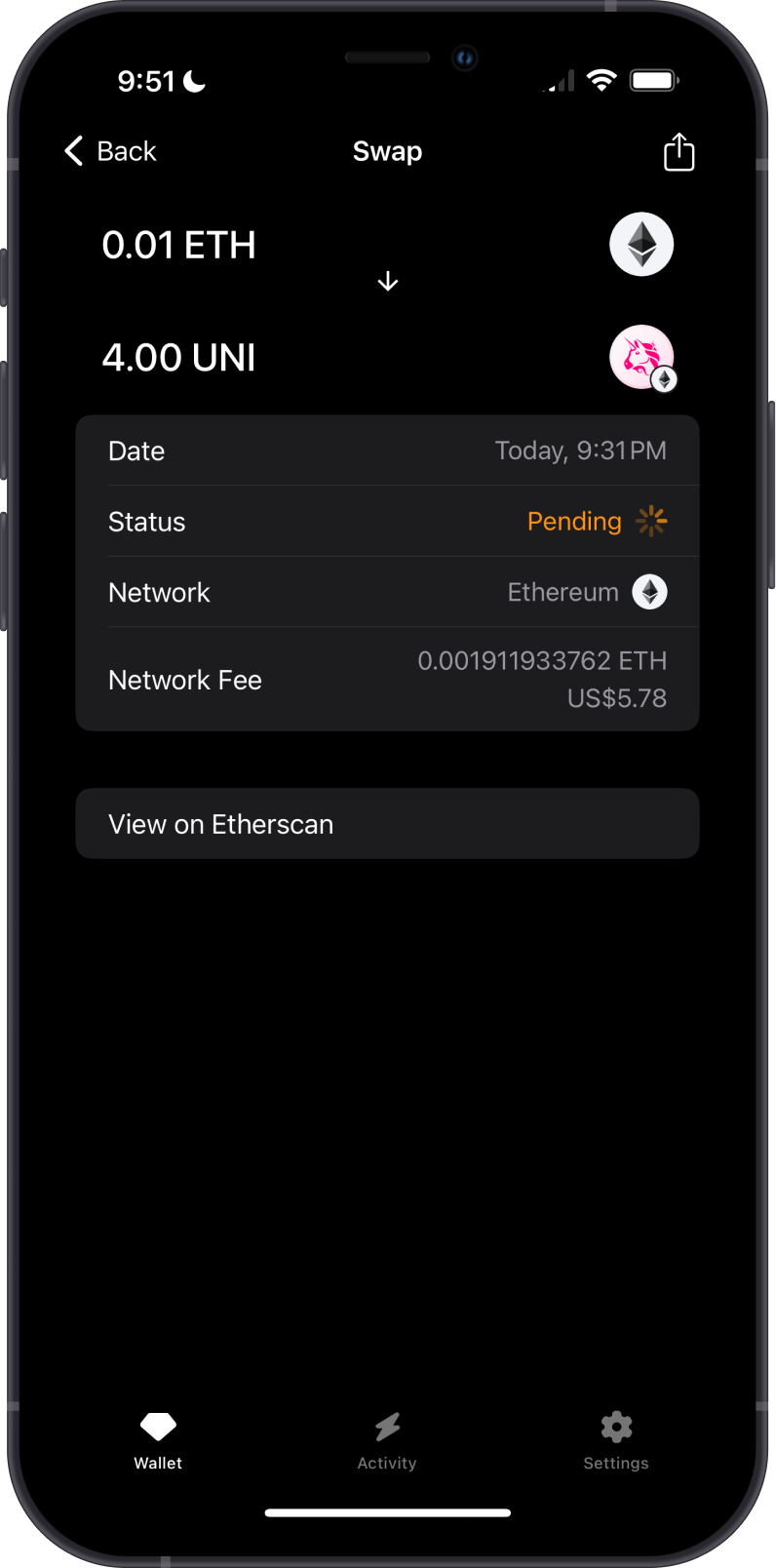
Use a transaction that already shows Pending in Gem Wallet. Do not submit another transfer just to reproduce the issue.
- Open Gem Wallet and select the asset used for the transaction.
- Select the pending transaction from the activity list.
- Confirm that its Status is Pending.
- Check Estimated confirmation when Gem Wallet displays it. This estimate is available for supported regular pending transactions and may change with network conditions.
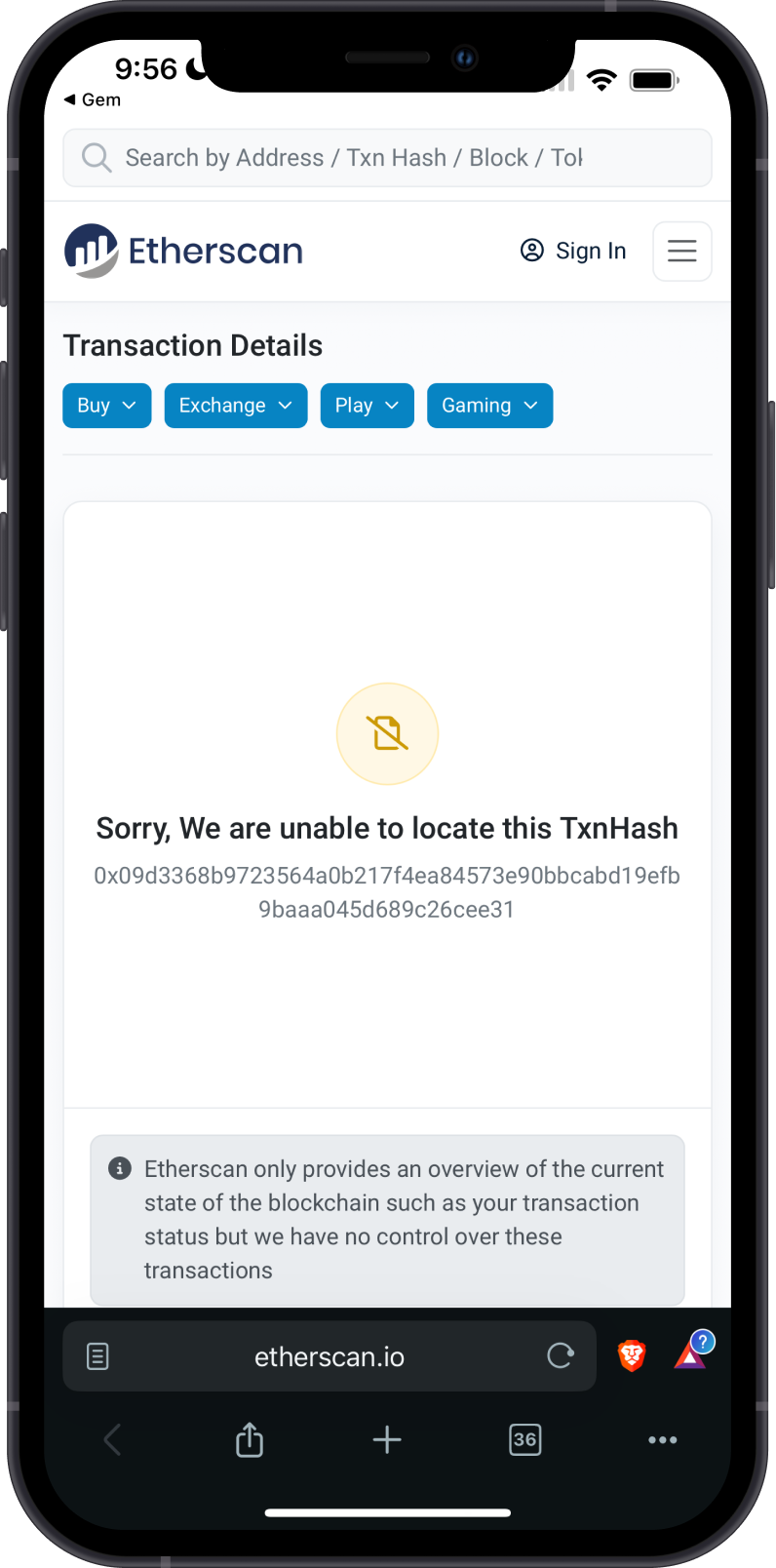
- Select View on explorer name at the bottom of the transaction details. For example, a Bitcoin transaction may show View on Blockchair.
The blockchain explorer is the best source for the network's current transaction status.
Never share your recovery phrase or private key when asking someone to check a transaction. A transaction ID and public wallet address are normally enough to investigate a public blockchain transaction.
What Does the Explorer Show?
The Transaction Is Pending
If the explorer finds the transaction but shows it as pending or unconfirmed, it is waiting for the network to process it. Common causes include:
- Network congestion — more transactions are waiting than the network can immediately process.
- A low network fee — miners or validators may prioritize other transactions first.
- A preceding transaction is still pending — account-based networks may process transactions from the same address in sequence.
- Temporary network or node delays — the wallet or explorer may take time to receive an updated status.
Wait for the network to confirm or reject the transaction. Do not repeatedly create the same transfer, because more than one copy could eventually succeed.
The Explorer Cannot Find the Transaction
If the explorer cannot find the transaction immediately, return to Gem Wallet later, reopen the transaction details, and select View on explorer name again. A recently created transaction may not yet be visible to the explorer.
If it remains unavailable:
- Make sure the device has a stable internet connection.
- Confirm that the transaction belongs to the expected asset and network.
- Update Gem Wallet to the latest available version.
- Reopen the app and check the transaction activity again.
Do not send the transfer again until you have established whether the first attempt was submitted.
The Explorer Shows Failed or Reverted
A failed or reverted transaction is no longer pending. The intended transfer or smart-contract action did not complete, although the network may still charge a fee for processing the attempt.
Check the explorer's error details, confirm that the wallet has enough of the network's native coin, and review the network fee guide before trying again.
Use Why Was My Crypto Transaction Reverted? to diagnose the execution failure. If the intended action failed but the balance still decreased by a fee, see Why Was I Charged a Network Fee for a Failed Transaction?.
The Explorer Shows Confirmed or Successful
The blockchain has processed the transaction. If the recipient or exchange does not display the funds yet, check:
- Whether the receiving platform requires additional block confirmations.
- Whether the correct blockchain network was used.
- Whether the asset is supported by the receiving wallet or exchange.
- Whether a required memo, destination tag, or comment was included.
If the transaction is confirmed but the balance is still missing, follow the receive issues guide.
Can Gem Wallet Cancel or Speed Up a Pending Transaction?
Gem Wallet cannot cancel a transaction that the blockchain has already confirmed. Whether a pending transaction can be replaced or accelerated depends on the blockchain and the transaction state.
Do not create a replacement transaction unless Gem Wallet explicitly provides a supported option and you understand the result. Sending the same payment again as a normal new transaction can cause a duplicate transfer.
How Long Should a Transaction Stay Pending?
There is no universal confirmation time. Bitcoin confirmation depends on block production and fee demand, while other networks use different confirmation and finality rules. Exchanges may also wait for several confirmations after the blockchain first marks a transaction successful.
Use the transaction's blockchain explorer rather than an estimated universal waiting time. If the transaction remains pending much longer than comparable recent transactions on the same network, collect the public details and contact support.
What to Provide to Support
Open Settings > Support in Gem Wallet and provide:
- The transaction ID copied from the blockchain explorer. Follow How to Find a Crypto Transaction ID if needed.
- The blockchain network used.
- The asset and amount.
- The approximate submission time.
- A screenshot of the status or error, with sensitive information hidden.
- The troubleshooting steps already completed.
Gem Wallet support does not need your recovery phrase or private key. Anyone asking for either one is attempting to gain control of your wallet.
Avoid Pending Transaction Problems
- Review the selected network and recipient details before confirming.
- Keep enough of the network's native coin for fees.
- Review the displayed network fee instead of choosing a fee that is unusually low.
- Send a small test transaction before a large first-time transfer.
- Avoid submitting the same transaction repeatedly.
For definitions of pending, failed, reverted, and successful transactions, see Understanding Transaction Status.
If the asset's balance details also show a Pending amount, see Why Does My Wallet Show a Pending Balance? to understand how it differs from Available.